Till, kitchen, dining room and kiosk: your whole restaurant in one place
On top of your online shop, ZipZest gives you a kitchen display, an order status screen for the dining room, a till for your team and a self-service ordering kiosk. Included in your subscription, on the screens you already have.
- Included in the subscription
- 30-day free trial
- No commitment
How it fits together
One order, four screens that talk to each other
Whether it comes from the online shop, the till or the kiosk, every order follows the same path, with nothing to type twice.
-
1. The order comes in
Online, at the till or on the kiosk: everything lands in the same place, with the same menu and the same prices.
-
2. The kitchen prepares it
It shows up on the kitchen display within seconds, with a sound alert.
-
3. The dining room is told
As soon as it’s ready, its number moves to “Ready” on the status screen.
-
4. The customer collects it
They see their number on the screen or follow the order on their phone.
Kitchen display (KDS)
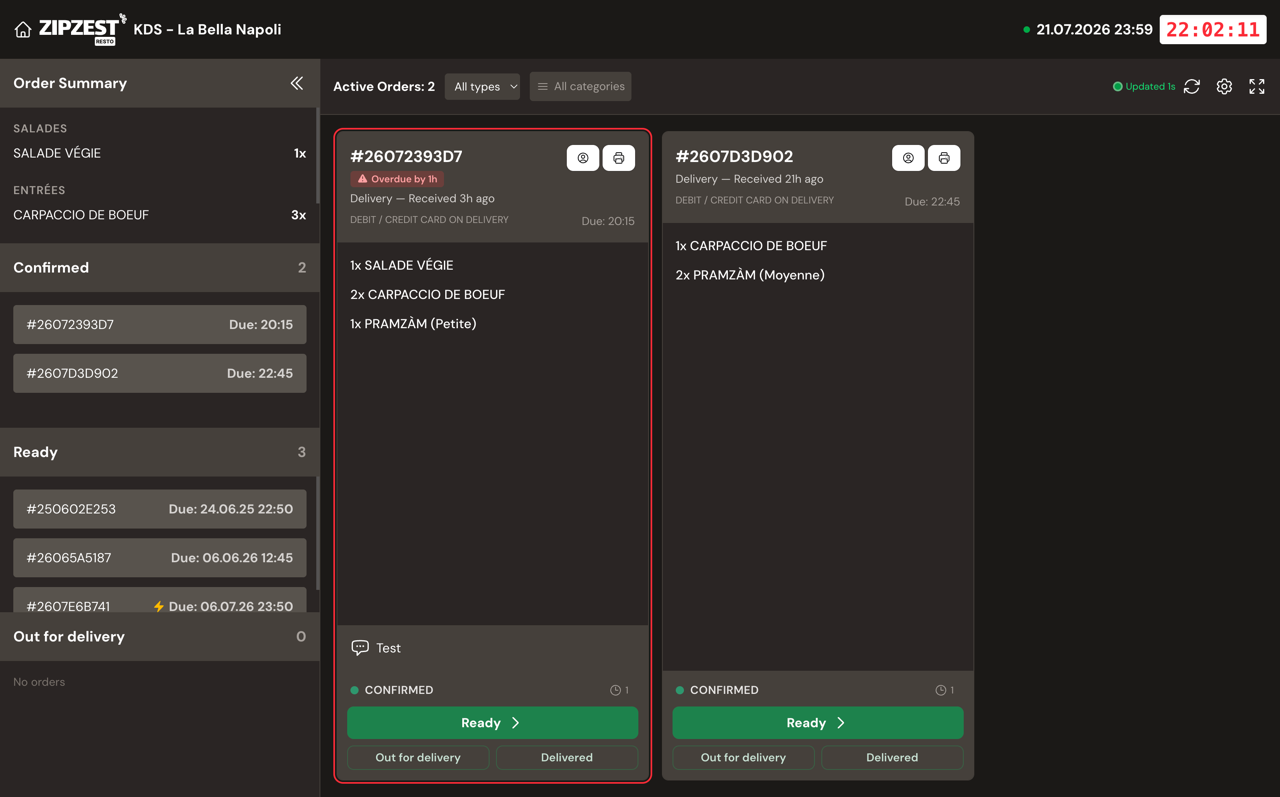
Your kitchen sees every order at the right moment
Replace paper tickets with a clear screen built for the rush. It runs in the browser of a tablet, a PC or a TV.
- New orders within seconds, with a sound alert
- Late orders stand out
- One screen per station: filter by category (pizzas, desserts…)
- Change statuses with one tap, with “Undo” if you make a mistake
- Keyboard or bump bar, short dish names and printable tickets
- Where each order comes from: online, till or kiosk
Order status screen
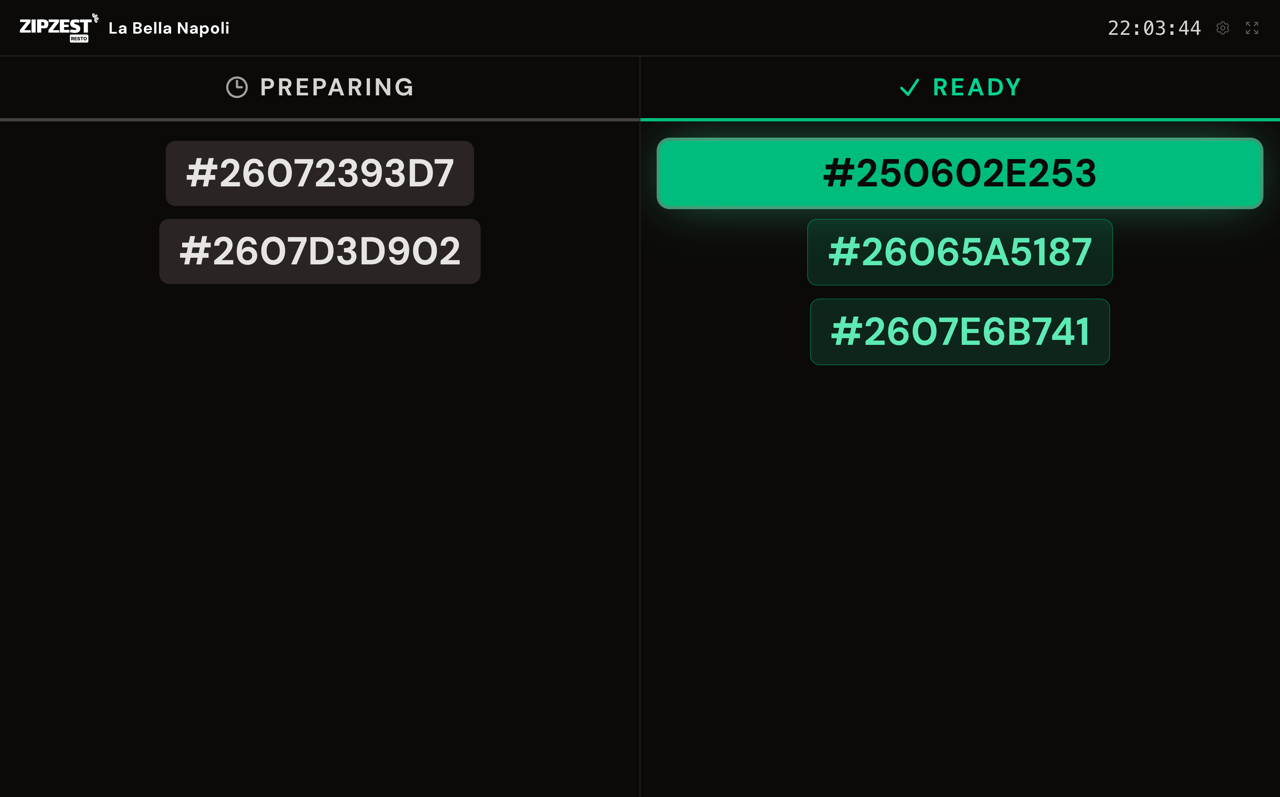
Your customers know when their order is ready
Show the numbers of the orders “Being prepared” and “Ready” on a TV. Fewer questions at the counter, a calmer dining room.
- Order numbers only: no personal data
- Sound alert when an order is ready
- “Being prepared”, “Ready” and, if you deliver, “Out for delivery” columns
- Choose which order types are shown (pick-up, delivery…)
Till (POS)
A simple till for your whole team
At the counter or on the phone, your team takes orders in a few taps on a tablet, a PC or a phone. They go straight to the kitchen.
- The same menu as your online shop: identical options, sizes and prices
- Phone orders: find the customer and their address, the delivery zone is checked
- Pick-up or delivery, now or for later
- Promo codes and the payment method noted (cash, TWINT, card on your terminal)
- Every team member has their own login
Self-service kiosk
Your customers order on their own, without queuing
Turn a tablet into an ordering kiosk. Customers browse the menu, build their order and pay at the counter.
- Activated with a one-time code: the kiosk never has access to your dashboard
- Your full menu, with photos and options
- Several languages: each customer picks their own
- A pick-up code and a QR code to follow the order on their phone
- Receipt by e-mail on request
- Shows “closed” outside your opening hours and reopens on its own
Everything included
No required hardware, no extra fees
All these tools are part of your ZipZest subscription. Use the tablets, screens and TVs you already have.
- Included in the subscription
-
Kitchen display, status screen, till and kiosks: no paid add-ons, no commission.
- Your hardware
-
A recent browser is all you need: tablet, PC, smart TV or phone.
- One single menu
-
Change a dish once and it changes everywhere: shop, till and kiosk.
- All your orders in one place
-
Online, till and kiosk orders in the same list.
Frequently asked questions
Your questions about the till, the KDS and the kiosk
Do I need to buy special hardware?
No. All the tools run in a browser. A tablet is enough for the till or the kiosk, and a TV or a screen with a browser for the status screen.
Do these tools cost extra?
No, they are included in your ZipZest subscription, just like the online shop.
How do customers pay at the kiosk?
They pay at the counter, with the payment methods you accept (cash, TWINT, card). The kiosk gives them a pick-up code.
Can I use several screens in the kitchen?
Yes. Each screen keeps its own settings: for example one for the pizzas and another for the desserts.
Can a kiosk access my dashboard?
No. It is activated with a one-time code and can only take orders. You can deactivate it at any time.
Ready to try?
Equip your restaurant today
Create your account, add your menu and open the kitchen display on a tablet: you’re ready.